
Every government IT organization has them: legacy Oracle databases holding thousands of scanned documents, inspection reports, compliance records, and photographs stored as BLOBs. These binary stores are expensive to maintain, difficult to integrate with modern applications, and often locked behind aging infrastructure. Migrating them to cloud-native storage like Azure Blob Storage is a well-understood pattern, but it still requires hours of hands-on engineering to provision infrastructure, write migration code, handle authentication, set content types, preserve metadata, and verify data integrity.
What if all of that could happen from a single prompt?
In a recent live demo, I showed an audience of developers, architects, and IT decision-makers exactly that: GitHub Copilot CLI autonomously building a complete Oracle-to-Azure-Blob-Storage migration utility, end to end, in under 20 minutes. I typed exactly two things. Copilot did everything else.
The Setup: Three Files and Nothing Else
The demo starts with a working directory containing just two files:
- CopilotDemoInstructions.md - A step-by-step playbook describing the entire migration workflow
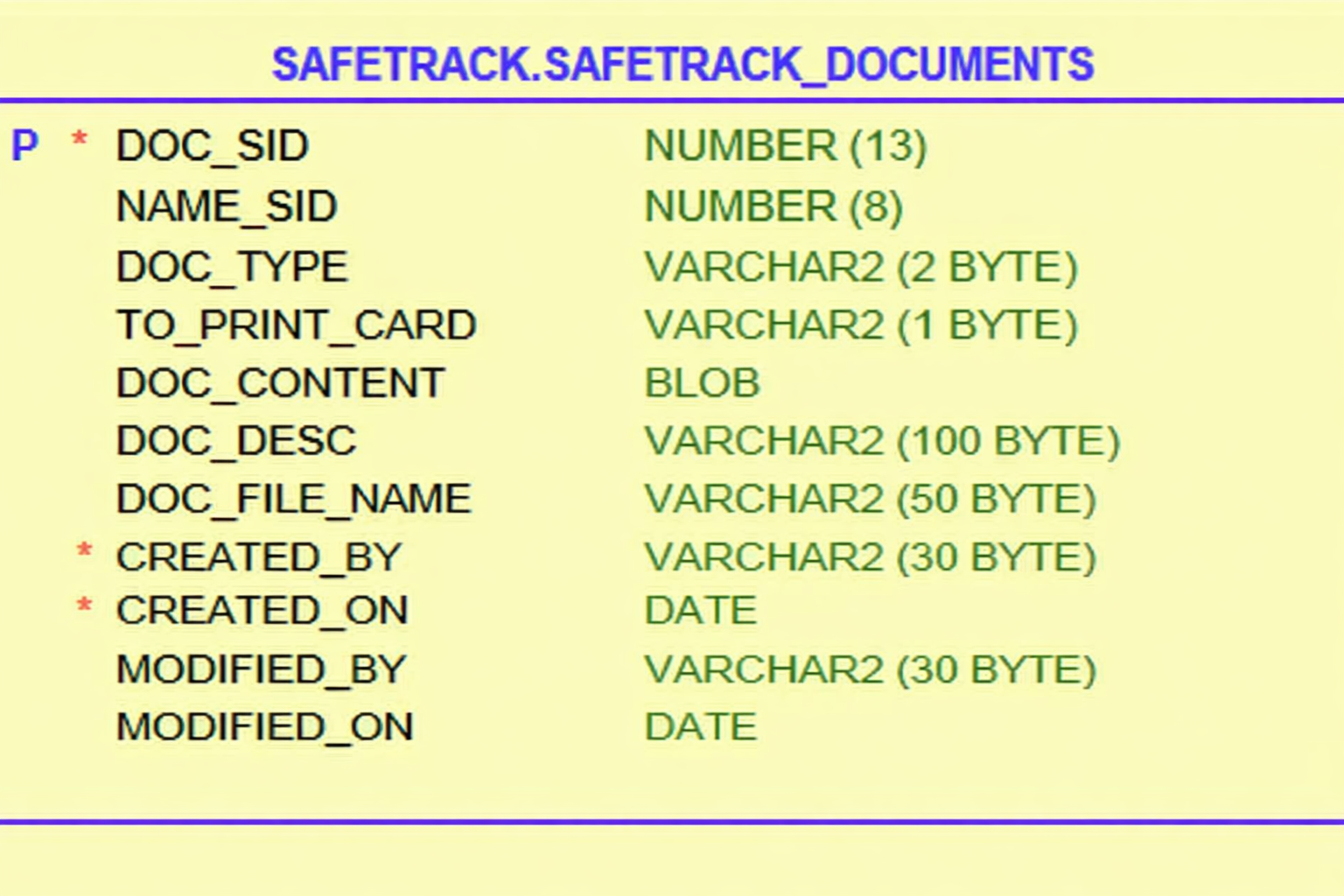
- SafeTrackSchema.png - A screenshot of the Oracle
SAFETRACK.SAFETRACK_DOCUMENTStable schema
No code. No infrastructure. No NuGet packages. No Azure resources. Just a markdown instruction file and a database schema image.
The Oracle table being migrated is representative of what you find in government legacy systems: a SAFETRACK_DOCUMENTS table with columns for document IDs (DOC_SID), document types (DOC_TYPE), binary content (DOC_CONTENT as a BLOB), file names, descriptions, and audit fields like CREATED_BY and MODIFIED_ON.
Launching Copilot in Autonomous Mode
GitHub Copilot CLI is a terminal-based AI agent that can read files, execute commands, write code, and interact with cloud services. It runs directly in your terminal and has access to the tools in your local environment. For details on Copilot CLI capabilities, see the official documentation.
The demo begins by starting Copilot CLI and enabling autonomous mode:
| |
The /yolo command (an alias for /allow-all) grants Copilot permission to execute commands, modify files, and interact with external services without pausing for approval on each action. Oonce given the initial instruction, it works through each step autonomously until the task is complete or it needs human input.
The follow @CopilotDemoInstructions.md prompt tells Copilot to read the instruction file and execute the steps it describes. From this point forward, the presenter only interacts when Copilot explicitly asks a question, such as confirming the Azure subscription or providing resource names.
What Copilot Builds Autonomously
Here is every step Copilot executes without human intervention after that single prompt:
1. Schema Analysis from an Image
Copilot opens SafeTrackSchema.png and extracts the full table structure, including column names, data types, sizes, and constraints. It identifies DOC_SID as the primary key (NUMBER(13)), the DOC_CONTENT column as a BLOB, and all metadata fields. This visual-to-structured-data capability is critical: many government systems have schema documentation only as screenshots, PDFs, or printouts from legacy tools.
2. Oracle Database Provisioning
Copilot pulls the gvenzl/oracle-free:slim container image and launches it with Podman:
| |
It then monitors the container logs, waiting for the DATABASE IS READY TO USE! message before proceeding. In a production migration, this step would be replaced by connecting to the existing Oracle instance.
3. Table Creation and Test Data Generation
Copilot generates a CREATE TABLE statement matching the schema image exactly and executes it against the containerized Oracle database. It then creates 10 sample records with realistic metadata and valid binary files across multiple formats: PDFs, DOCX, XLSX, JPG, PNG, and TXT. These are not random bytes; they are structurally valid files that will survive content-type detection and file-type validation after migration.
4. Azure Infrastructure Provisioning
Using the Azure CLI, Copilot provisions the complete Azure infrastructure:
| |
The instructions include automatic retry logic for storage account name conflicts (names must be globally unique across all of Azure), and the container is created with private access by default, meaning no anonymous access is allowed. For details on Azure Blob Storage architecture, see Introduction to Azure Blob Storage.
5. .NET 10 Migration Application
This is where the demo gets technically impressive. Copilot creates a complete .NET 10 console application from scratch, including:
- Project scaffolding with
dotnet new console - NuGet packages:
Oracle.ManagedDataAccess.Core,Azure.Storage.Blobs,Azure.Identity, andMicrosoft.Extensions.Configuration.Json - Configuration management via
appsettings.jsonwith support for both connection-string andDefaultAzureCredentialauthentication - Full migration logic in
Program.cs
The core migration pattern follows this flow for each Oracle record:
| |
The application uses DefaultAzureCredential for authentication, which automatically resolves the identity from the Azure CLI login. This means no connection strings or secrets are hardcoded. In production, this same credential chain seamlessly transitions to Managed Identity when deployed to an Azure host.
Blobs are organized in Azure using the path pattern {DOC_TYPE}/{DOC_SID}/{DOC_FILE_NAME}, creating a logical folder structure by document type (inspections, compliance orders, photos, reports, warnings). Each blob receives the correct Content-Type header based on file extension, and all original Oracle column values are preserved as blob metadata.
6. RBAC Configuration
Before running the migration, Copilot assigns the Storage Blob Data Contributor role to the current Azure CLI identity, scoped to the specific storage account. This follows the principle of least privilege: the identity gets only the permissions needed for the task, and only on the target resource.
| |
7. Migration Execution and SHA256 Verification
Copilot builds and runs the application with dotnet run. For each document, the app logs the document SID, type, file name, byte size, and a truncated SHA256 hash. After all 10 documents migrate successfully, Copilot performs a critical verification step:
It downloads every blob back from Azure, computes a fresh SHA256 hash, and compares it against the hash stored in the blob’s metadata during upload. This provides cryptographic chain-of-custody verification that every file arrived in Azure unchanged from its Oracle source.
For government organizations handling inspection records, compliance documents, or legal evidence, this integrity verification is not optional. It is proof that the migration preserved data fidelity.
8. Full Cleanup
After the presenter confirms, Copilot deletes the Azure storage account, removes the resource group, stops and removes the Oracle container, and deletes all generated code, leaving only the original three files.
The Instruction File Pattern
One of the most powerful aspects of this demo is the pattern it demonstrates: encoding complex engineering workflows as instruction files that Copilot can follow autonomously.
The CopilotDemoInstructions.md file is a 13-step playbook written in plain markdown. It describes prerequisites, connection details, SQL patterns, Azure CLI commands, .NET project structure, NuGet packages, authentication strategies, and verification procedures. Copilot reads this file and executes each step, making decisions when the instructions leave room for judgment (like generating realistic test data) and asking the human operator when the instructions explicitly call for confirmation.
This pattern is directly applicable to government IT operations. Consider encoding your organization’s standard procedures as instruction files:
- Database migration runbooks for moving legacy data stores to Azure
- Infrastructure provisioning playbooks for standing up compliant environments
- Application deployment procedures with pre-flight checks and post-deployment verification
- Disaster recovery test scripts that validate backup and restore procedures
You can further enhance this pattern with custom instructions that encode organization-specific standards, naming conventions, and compliance requirements.
Why This Matters for Government
Legacy Oracle document stores are everywhere in government. Agencies that adopted Oracle in the 2000s often have millions of scanned documents, photographs, and reports stored as BLOBs. These databases are expensive to license, difficult to scale, and increasingly mismatched with modern cloud-native architectures.
Azure Blob Storage is the natural migration target. It offers multiple redundancy options, lifecycle management policies for archival, and native integration with Azure AI services for document processing. Blob Storage is available in both Azure commercial and Azure Government regions with feature parity.
The migration pattern demonstrated here is production-ready. The combination of DefaultAzureCredential authentication, RBAC-scoped permissions, Content-Type preservation, full metadata retention, and SHA256 integrity verification addresses the core requirements of a government data migration: security, auditability, and data fidelity.
AI-assisted development is a force multiplier for constrained IT teams. Government agencies often face hiring challenges and competing priorities. A task that would take an experienced developer several hours, including research, coding, testing, and verification, was completed autonomously in under 20 minutes. This is not about replacing developers; it is about giving them leverage to accomplish more with the resources they have.
The autonomous execution paradigm changes the conversation. GitHub Copilot CLI is not autocomplete. It reads images, provisions infrastructure, writes applications, executes migrations, and verifies results. For IT leaders evaluating AI tools, this demo demonstrates a concrete, measurable capability: take a documented procedure and let an AI agent execute it end to end, with human oversight at defined checkpoints.
Getting Started
To explore GitHub Copilot CLI for your own migration scenarios:
- Install GitHub Copilot CLI following the setup guide
- Start with a small, well-defined task - a single table migration, a container deployment, or an infrastructure provisioning workflow
- Write an instruction file that describes the steps in plain language, including prerequisites, expected outputs, and verification criteria
- Run in interactive mode first to understand how Copilot interprets your instructions, then graduate to autonomous mode once you are confident in the workflow
- Review the Azure Blob Storage .NET quickstart at Microsoft Learn to understand the SDK patterns Copilot generates
The demo materials, including the instruction file and schema image, provide a template you can adapt for your own Oracle-to-Azure migration scenarios. The pattern scales from 10 documents to millions: the architecture is the same, with the addition of batching, parallelism, and checkpoint/resume logic for production workloads.
Watch the Demo
See the full demo in action — from the initial prompt to completed migration with integrity verification:
Demo Materials
- Copilot Instructions File — The step-by-step playbook Copilot CLI followed autonomously
- Database Schema Image — The Oracle
SAFETRACK_DOCUMENTStable schema used as the starting point
Government IT teams sitting on legacy Oracle document stores now have a concrete path forward, and an AI-powered assistant that can help execute it.